
Bank Account management is the module to define bank accounts and their details , which would be used in the transactions for the company.
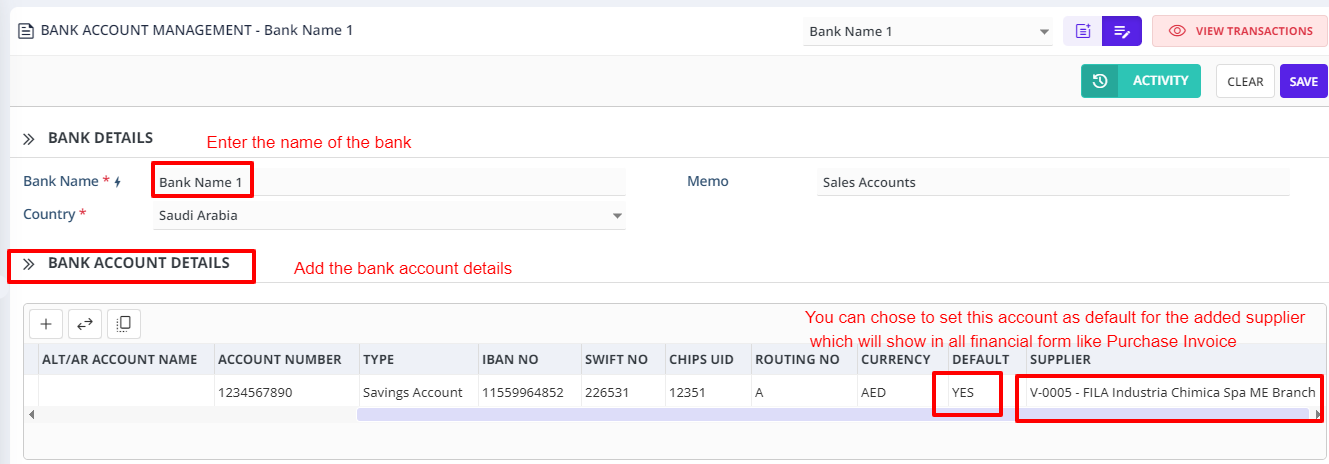
Bank account details grid
1.Branch Name- Add the branch name of the bank
2.Code-Add the Branch Code
3.Address- Add the bank address
4.Account Name- Add the Bank Account name
5.Alt/AR account name- You can Add alternate to the bank account name to be mentioned in the system records
6.Account Number- Add the bank account number
7.Type- Add the account type as to whether savings or current account
8.IBAN No- Enter the IBAN number as required
9.SWIFT Number- Enter the SWIFT number as required.
10. CHIPS UID- Enter the CHIPS UID number for the bank
11.Routing Number- Enter the routing number for the bank
12.Currency- Enter the default currency of the bank account
13Default- Choose YES if the bank account is going be as a default bank account to be linked to the supplier that is being added and will be used in financial forms like Vendor bill payment etc.,
14.Supplier- Add the supplier name to be linked with the bank account so that the tax levied on bank charges incase of interbank transactions will be accounted to the supplier.
Click on ADD to create the Bank account in the database.