
A quick Snapshot of the HAL Pay Data Flow is as follows:
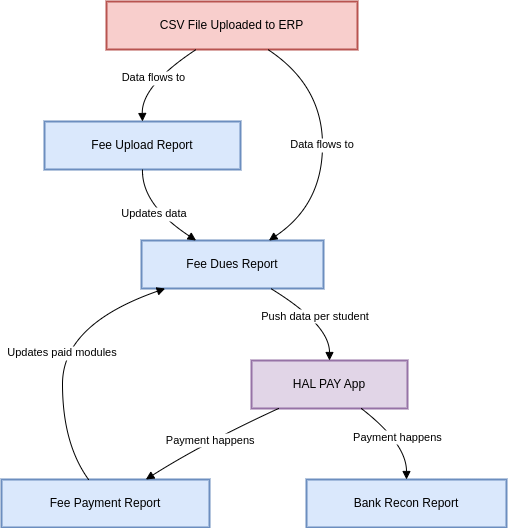
The diagram outlines the data flow process for uploading fee-related information into an ERP system, tracking payments, and generating corresponding reports. Here’s a detailed explanation of each step:
-
CSV File Uploaded to ERP:
- The process begins with the bulk upload of fee-related data using a CSV file into the ERP system.
-
Fee Upload Report:
- Once the CSV is uploaded, the data flows into the Fee Upload Report, which captures the uploaded details for verification and tracking.
-
Fee Dues Report:
- The information from the Fee Upload Report is then used to update the Fee Dues Report, which lists all outstanding fees for students.
-
HAL PAY App:
- The Fee Dues Report pushes individual student data to the HAL PAY App, enabling students or payees to make payments through this application.
-
Payment Happens:
- Payments are processed through the HAL PAY App, and data flows into two reports:
- Fee Payment Report: Tracks payments received and updates the ERP system to reflect paid modules.
- Bank Reconciliation (Recon) Report: Ensures that payments recorded in the system are reconciled with the bank's records for accuracy.
- Payments are processed through the HAL PAY App, and data flows into two reports:
-
Updates:
- The reports dynamically update throughout the process:
- The Fee Payment Report reflects cleared dues.
- The Bank Recon Report ensures financial accuracy between the ERP and the bank.
- The reports dynamically update throughout the process:
This flow ensures a streamlined and transparent process for fee collection, payment tracking, and financial reconciliation.