
A manufacturing order comprises various operations to get a perfectly finished product. In the HALERP Manufacturing module, you can specify all these operations as Work Orders while configuring a manufacturing order. These work orders will process operations at specific work centers.
To create a Work order, Go to Manufacturing->Work order-> Click on Create New

You can select a Sales order and the respective item which is to be manufactured (inventory assembly item) will be populated in the Order Item dropdown field.
Note : If there are multiple Inventory assembly items, then multiple Work orders have to be created
Once the item is selected, the corresponding BOM will be populated in the BOM field. If there are multiple BOM for the same item, then the user can choose from the listed BOM.
To know more about how to set up a BOM- Bill of Material for an item, please click this link Setting up of BoM

In the next section, you can enter the current stage of processing of the work order.

In the QC details section, the details of the Quality check done on the finished product can be entered.
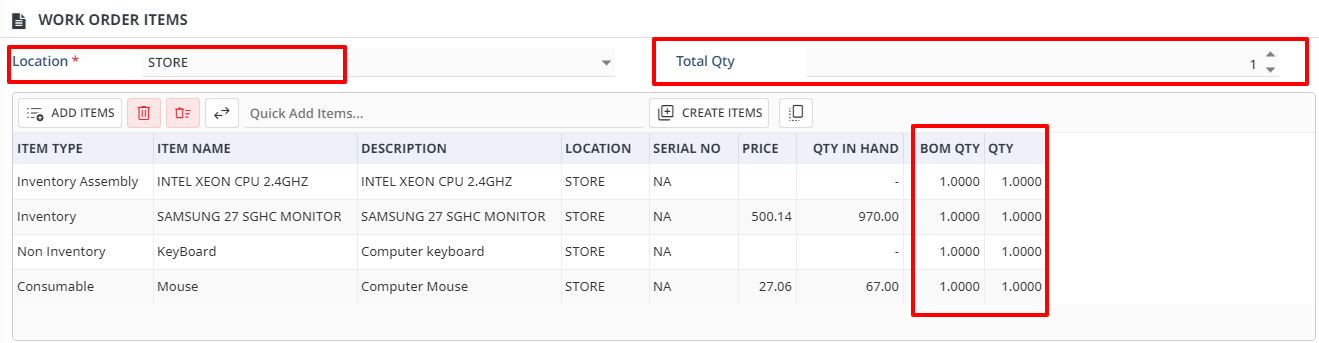
In this section, the items added in the selected BOM will be listed in the grid and the work order will be processed in the selected location.
If this item required to be manufacture more than 1 Qty, then it can be updated or edited in TOTAL QTY field
Once all the details are entered, click on ADD button to create the WORK ORDER transaction.