
Fee Adjustments:
There are often cases where you need to make some adjustments to a student's fee. Our Fee Adjustment Screen lets you make any sort of adjustments to a student's fee in the most simplest way.
Why Fee Adjustments are needed?
- To charge extra fee to a student as an additional fine or charge
- To waive late fee or give concession to a student's fee for certain genuine cases
- To schedule a new fee head for the future so that the next time the student comes to pay the fee, this new fee with reason would be shown to him.
- Cases where there has been a mistake in the data entry done by the collection staff. In such cases you can use fee adjustment module to make any necessary adjustments.
- To make adjustments for a student's fee if the sibling has taken TC having Fee backlogs.
- When System error or failure occurred.
- When there is an error during Fee Configuration Setup.
How to create a Fee Adjustment?
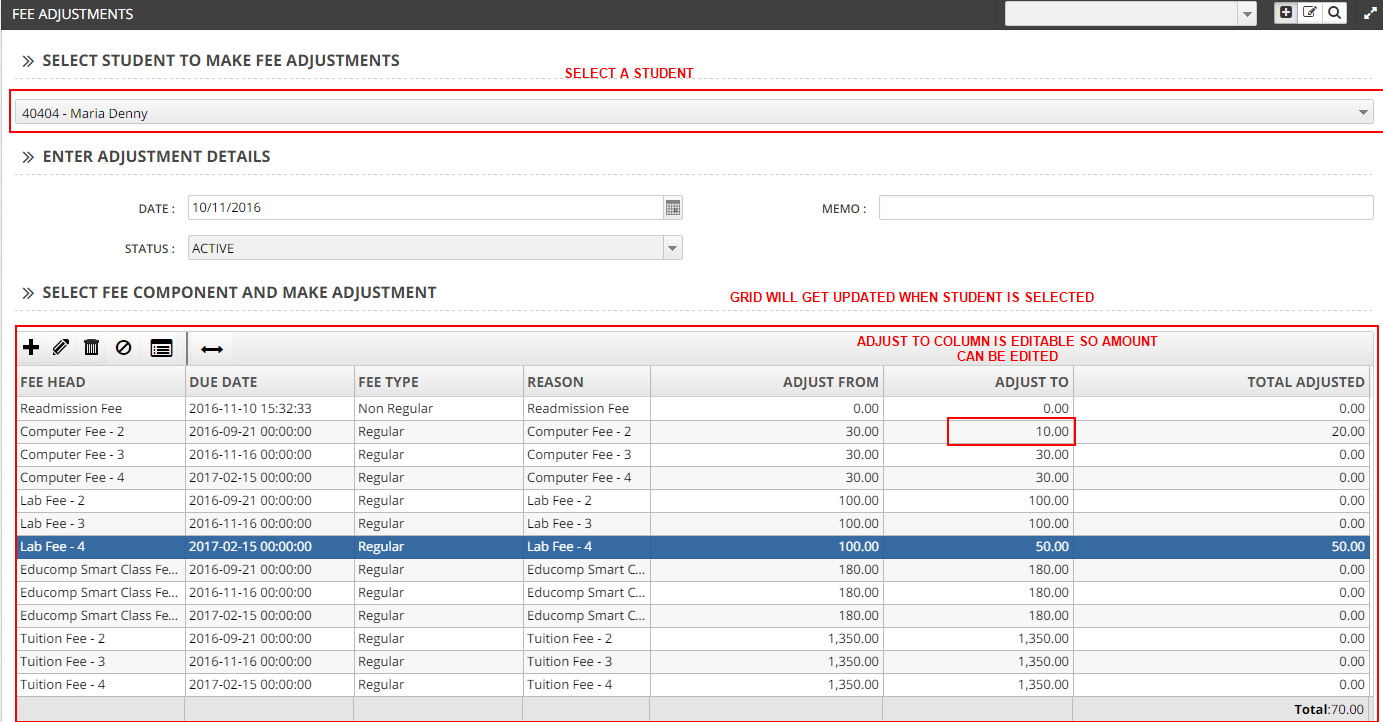
- Goto Fee-->Fee adjustments. Select a student who has paid the fee atleast once.
- All pending fee for the student would be listed in the grid under Fee Component and Make Adjustments label. Choose the Fee items to give adjustments.
- The Adjust From field shows the amount that is currently due from the student.
- In the Adjust To field, enter the amount you want to charge the student - this will be the final amount the student will see.
- Reasons should be given when fee adjustments are done.
What to do when wrong adjustments are given?
You can either delete this Fee Adjustment to VOID the changes or simply create a new adjustment to offset the changes done.