
What is a Journal Entry?
Journal is a record that keeps accounting transactions in an order i.e., as they occur.
A manual journal entry that is recorded in a company's general journal consists of
- Date
- Account to Debit
- Account To Credit
- Amount that will be debited
- Amount that will be credited
- Narration/memo
- A reference such as cheque number
Usually in **++HAL ERP finance system++ ** there is very rarely the need to use Journal Entries directly. This is due to the fact that the application takes care of all the major accounting activities and will post Journal Entries automatically for you. All Journal entries that are posted are available to view from the General Ledger and Account Ledger Report.
One good example of where you would use Journal Entries is when you want to make any corrections directly at the ledger level.
Another example would be to achieve any accounting activity which is normally not possible through any of the available screens.
We also use Journal Entry during the initial data migrations to load a company’s existing Balance Sheet into our system
A sample Journal Entry has been shown below for our system.
Note : A Journal Entry should always balance. i.e. The Total Credit and Total Debit must always be equal.
How to use Journal Entry?
Goto --> Accounting --> Journal Entry --> Create New
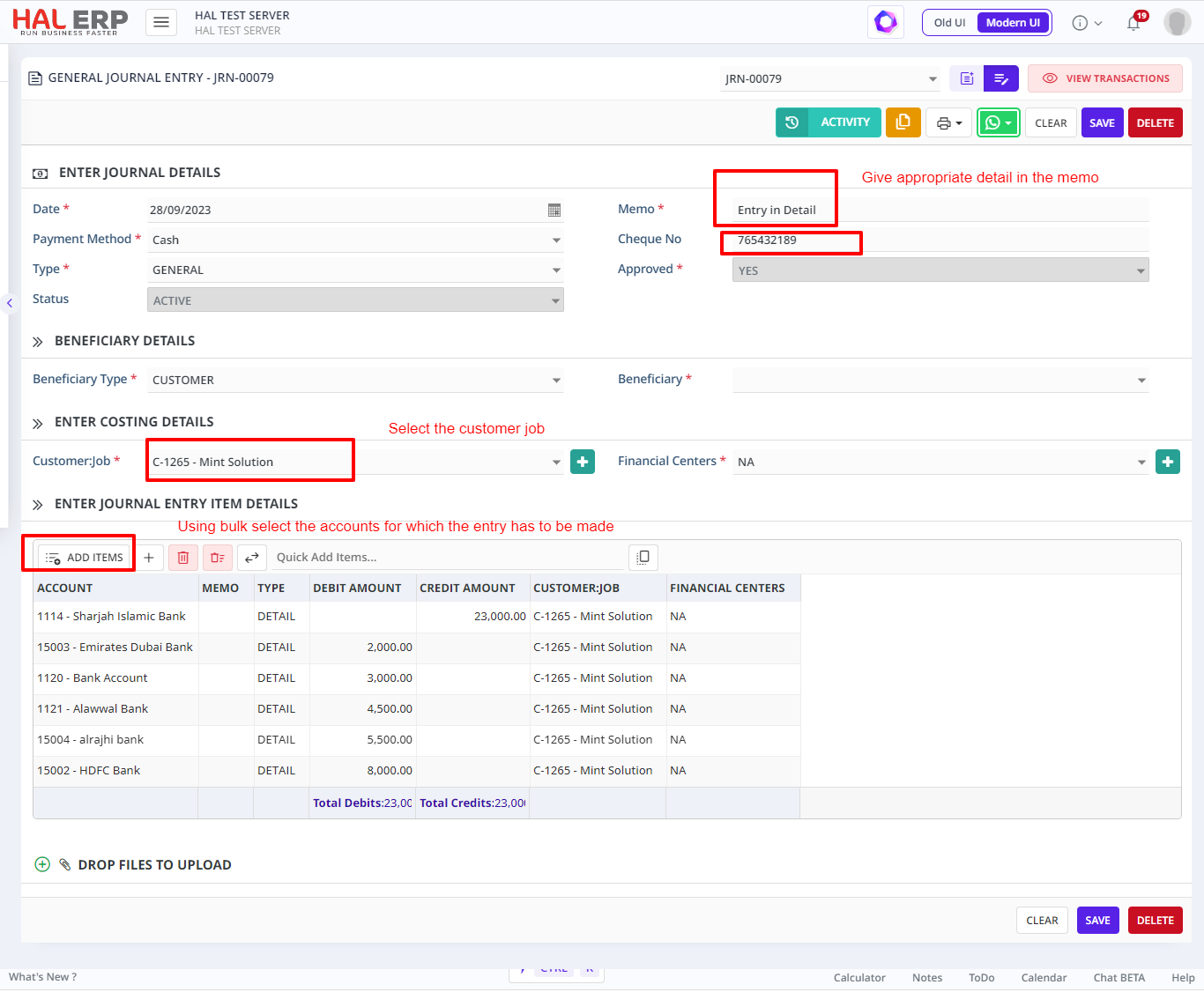
Click on Add button to save the entry made.